

Most customer experience teams don’t lose trust in the big, dramatic moments.
AI is making CX simultaneously much easier and much harder. Customers can get answers faster than ever, but they also have a shorter fuse for disjointed experiences. For CX leaders, that creates a clear mandate: make context travel across email, chat, social, and SMS so customers don’t have to start over every time they switch channels.
In practice, this looks like a minimum viable omnichannel data model: a shared set of customer fields, tags, and handoffs that gives our CX teams a single, reliable view of “who this person is, what happened last, and what we should do next.”
Along the way, we’ll reference real examples and share details about a Boldr x Richpanel event in Austin at the end of January, where we’ll help you map your current channel setup and leave with a practical template for unifying human + AI interactions.
The high cost of fragmented channels in CX
In too many organizations, support channels still operate in silos. Email, live chat, social DMs, and SMS might as well exist on different planets, with customer context getting stuck in whichever tool it started in.
That experience is frustrating for customers and expensive for brands. Forrester’s 2024 CX Index results show US consumer perceptions of CX quality dropped for a third year in a row and reached the lowest point since the CX Index began.
Consider a common scenario: a customer tries self-service, then starts a live chat, then follows up by email when the bot can’t fully resolve the issue. If your operation is still running in a multichannel mindset, your support team receives that email with little to no awareness of what already happened. The customer has to explain the same problem again, and their patience drops fast.
When this happens repeatedly, it creates two compounding problems:
- Customer trust erodes because it feels like no one is listening.
- Team effort multiplies because the same context is gathered, typed, and retyped across tools.
On the flip side, omnichannel support solves this by integrating channels and preserving continuity, so each touchpoint picks up where the last one left off.
Fragmentation red flags: are you seeing these signs?
- Your support team can’t recognize when the same customer contacts you on different channels (each interaction is treated like a new case).
- Customers repeat their order number, issue details, or prior steps taken whenever they escalate or switch channels.
- Separate tools don’t share customer history, preventing a unified view of context.
- Responses become inconsistent because each channel has only part of the story.
If any of this sounds familiar, we don’t need to rebuild everything at once. We need a minimum viable foundation that ensures context doesn’t disappear as customers move.
Why a unified customer record matters more than ever
Moving to a unified omnichannel data model isn’t just a technical upgrade. It’s a strategic shift that turns CX from reactive ticket-handling into a proactive, revenue-driving function.
When our teams have a 360° view of the customer (orders, conversation history, preferences, loyalty status, prior outcomes), they can deliver service that feels personal and efficient. Instead of seeing a faceless ticket, the team sees Joe Smith, a loyal VIP customer, who just searched the help center and reached out about order #12345. With that context, we can skip redundant questions, empathize quickly, and resolve the issue faster—sometimes with a loyalty-friendly concession that protects long-term value.
A unified view also enables proactive support. If the system knows a customer abandoned a cart and then contacts support, we can respond with awareness: “I saw you were looking at X—can I help with sizing, shipping, or something else?”
Most importantly, a unified model helps CX become a growth driver. Richpanel’s Bicycle Warehouse story is a useful example of what can change when a team moves from siloed tools to a unified workflow and context layer.
Finally, this approach future-proofs our operation for AI. When data is clean and connected, it becomes far easier to layer in AI workflows that are helpful instead of generic.
National Australia Bank’s “Customer Brain” is a real-world example of this direction: NAB describes it as an AI-powered engine designed to help deliver tailored experiences efficiently. The broader framing shared publicly is a centralized intelligence layer meant to support consistent decisions across customer touchpoints.
The minimum viable omnichannel data model: tags, fields, and handoffs
Here’s the good news: we don’t need an infinitely complex data lake to get results. The goal is a minimum viable model that reliably answers four questions:
- Who is this customer?
- What happened previously?
- What’s happening now?
- What should we do next—and who owns it?
Below are the core building blocks that get us there.
Unified customer ID
Establish a consistent way to recognize the same person across channels. That might be a unique customer ID in your CRM, or matching based on email/phone number. Every interaction—email, chat, DM, SMS—should attach back to a single customer profile.
Central conversation thread or case record
Instead of treating each channel’s inquiry as separate, use a system that merges or associates interactions into one case history. If someone emails support and later opens a live chat, your team should be able to see both in one timeline.
At minimum, that timeline needs:
- timestamps
- transcripts
- internal notes
- outcomes and next steps
Richpanel explicitly positions “unified conversations” and a single console as part of making omnichannel workable in practice.
Consistent tags and categories
Create a shared, limited taxonomy of tags that apply across channels. If an issue is tagged “Billing” in email, it should carry through if the customer follows up via chat. This is how routing becomes consistent and reporting becomes meaningful.
Keep your first pass lean:
- issue type (billing, returns, shipping, bug)
- product line (if relevant)
- urgency / tier
- customer type (VIP, new buyer, enterprise)
A minimum viable tag set you can actually govern
If we’re starting from scratch (or cleaning up tag sprawl), we’ve had the best luck with a tag model that answers: what is this, how urgent is it, who is it, and what needs to happen next. Keep tags tight enough to train consistently, but useful enough to route and report.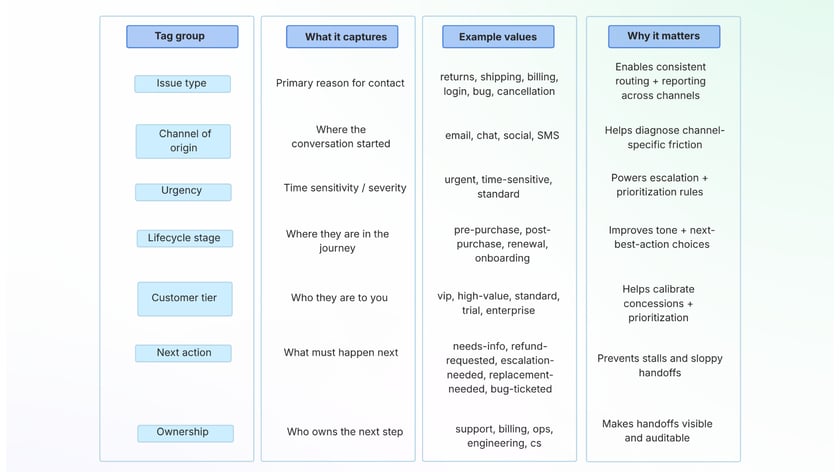
Guardrails that keep this from getting messy:
- Limit “issue type” to 10–15 values max at first.
- Reserve “next action” for workflow triggers (not commentary).
- If a tag doesn’t change routing, reporting, or next steps, it’s probably noise.
Shared customer profile data
At minimum, your team needs contact info and basic account details. Ideally, you extend that to:
- purchase/order history
- recent browsing/cart activity (for ecommerce)
- plan level (for SaaS)
- loyalty tier
- prior support interactions and outcomes
This is what makes personalization real without adding extra work.
Cross-channel context handoffs
This is where many teams break: the tools might “integrate,” but the handoff still fails operationally. For continuity, we need both:
- Systems that connect (so history is visible across channels)
- Processes that carry context (so escalations don’t reset the conversation)
If a chatbot escalates to a human teammate, that teammate should receive a summary or transcript. If a social DM becomes an email ticket, the ticket should include what already happened.
Done well, customers stop hearing “Can you explain the issue again?” because the workflow already preserved the story.
Issue tracking and resolution data
Track status consistently across channels (“Open,” “Waiting on customer,” “Resolved”), and log the outcome. That way, if the customer comes back next week on a different channel, the team can immediately see what happened last time—and whether this is a repeat issue, a related issue, or something new.
Customer context + workflows: the operating layer that makes omnichannel real
Data unification is only half the battle. The other half is operationalizing it through workflows that make sure context is actually used.
Here are workflow patterns that turn unified data into a smoother experience:
Intelligent routing
Use tags and customer fields to route conversations to the right specialist without delay. “VIP + billing” goes to billing. “Warranty claim” routes to the warranty path. This reduces transfers and keeps customers from repeating themselves.
Seamless channel transitions
When a channel switch is needed, the workflow should preserve continuity. For example: a chat escalates to a phone call, and the person calling already has the transcript and order details pulled up.
Richpanel’s content emphasizes unifying channels in a single place (email, live chat, SMS, and social), so context sits next to each conversation instead of living in separate tabs.
Pre-filled context for support teammates
When someone opens a ticket or accepts a chat, the system should automatically display key profile fields and recent history. This saves time and improves tone because we can acknowledge what’s already happened.
Automation for repetitive tasks
Rules can carry context for you:
- auto-attach forms to the customer record
- flag urgent issues
- trigger escalation paths
- route based on intent/category
In the Bicycle Warehouse example, Richpanel highlights workflow templates and automation patterns to reduce manual work and keep service consistent.
Analytics and continuous improvement
Once context is unified, you can spot patterns:
- repeat contact reasons
- channel switching behavior
- bottlenecks in handoffs
- tags that need refinement
This is where the model gets smarter over time—and where you start preventing issues, not just responding to them.
Bringing your channel map to life in Austin
Developing a unified model can feel daunting—but it’s much easier when we start by mapping what already exists.
A great first step is to sketch your current channels and data flows:
- Where does customer context get lost?
- Which tools need shared fields?
- What are the “must-have” data points (order ID, account ID, plan tier, etc.)?
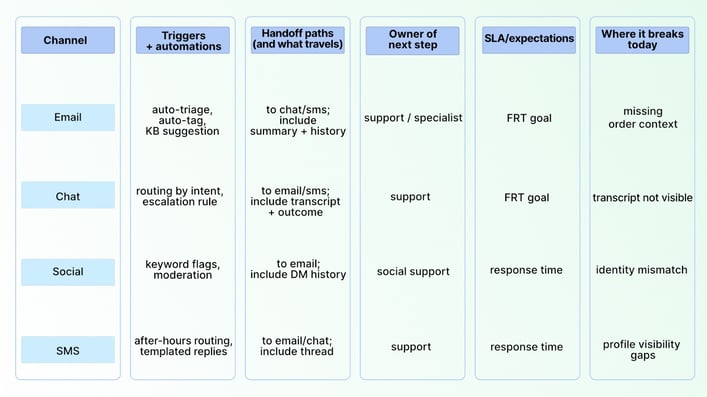
Bring this to Austin: the channel map template (one page)
If you have 30 minutes, you can capture 80% of what you need. Start by mapping each channel as it exists today—tools, identity matching, what context is captured, and where handoffs break.
A simple way to run this internally (60 minutes):
- 10 min: list every entry point (including the “weird” ones like comment threads)
- 20 min: agree on identity matching rules (email, phone, order ID, account ID)
- 20 min: choose your minimum viable fields + tag set
- 10 min: circle the top 3 breakpoints where context gets lost—those become your first fixes
To help CX leaders do this in a practical way, Boldr and Richpanel are co-hosting an event in Austin at the end of January focused on building continuity across human + AI interactions.
If you want to learn more about Boldr’s approach to building ethical, scalable teams and operational clarity in CX, you can find us at Boldr’s site. If you want to see how Richpanel describes consolidating channels and surfacing customer context in one place, you can explore Richpanel’s platform overview and resources.
In 2026, leading brands will differentiate on continuity. No more disjointed handoffs and “start from scratch” moments. Instead, we’ll aim for an experience where context travels naturally—across channels, across teammates, and across time.
Start with the fundamentals: unify your customer profile and conversation history, use tags that drive routing and reporting, and build handoffs that preserve the story. The result isn’t just smoother support—it’s a CX operation that can scale and drive growth.